 Debt Payoff Planner
See when you could be debt-free, and which method costs less.
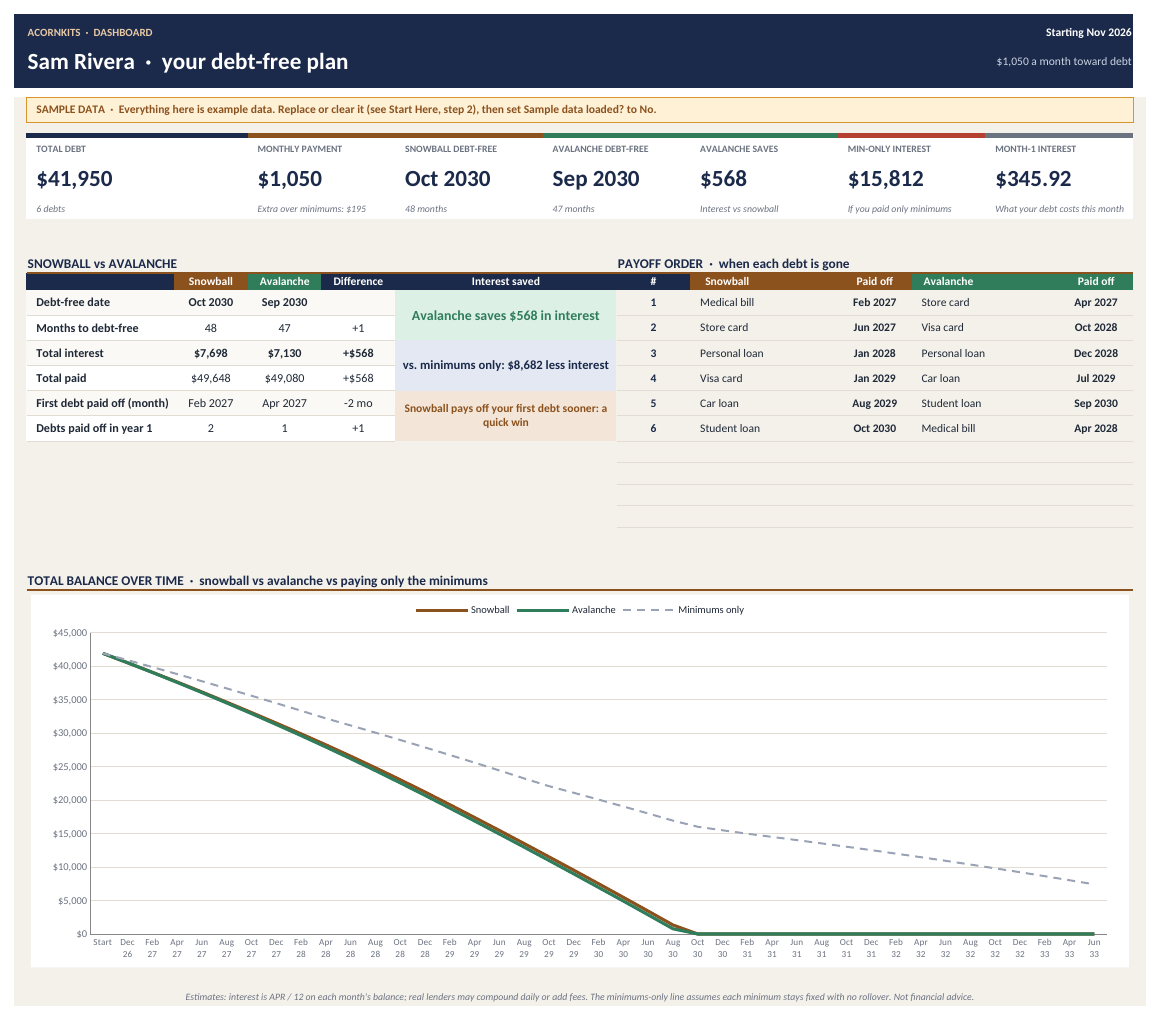
Debt Payoff Planner is one Excel and Google Sheets workbook that runs the debt snowball and debt avalanche side by side for up to 10 debts. Enter your balances, APRs, minimums and monthly payoff budget to see an estimated debt-free date, total interest for each method (or your own custom order), what paying a little extra each month would save, the payoff order and a month-by-month schedule.
- Excel + Google Sheets
- No macros
- SAMPLE data included
- One-time $7
Sound familiar?
Snowball or avalanche?
Everyone has an opinion. You want to see the numbers for your own debts.
No finish line
Without a date to aim for, it's hard to stay motivated month after month.
Minimums that barely move
Some minimum payments hardly cover the interest, and it's not obvious which ones.
Am I on track?
You've been paying for months but can't tell if you're ahead of the plan or behind.
What's inside
One .xlsx workbook with 9 sheets, plus a printable How-to-Use PDF and a README. SAMPLE rows come pre-filled so you can see how everything works before you add your own data.
Start Here
Your monthly payoff budget, first payment month and the plan you're following.
Dashboard
Debt-free date, months, total interest and total paid for each method, the savings of one over the other, payoff order and a balance chart with a minimums-only line.
Debts
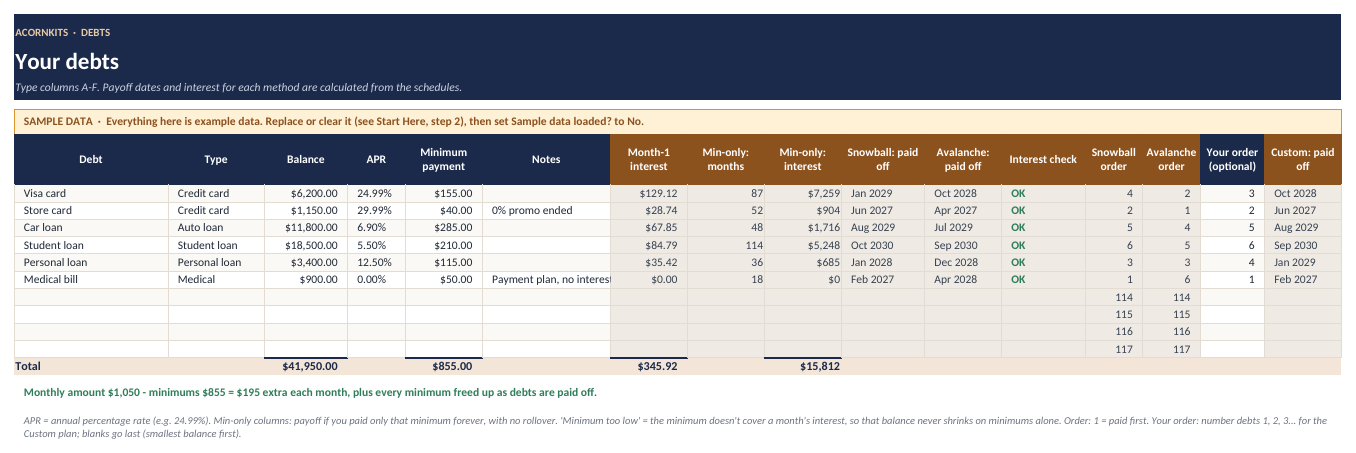
Up to 10 debts with minimum-only payoff, payoff month per method, an interest check, priority order and an optional custom order.
What If
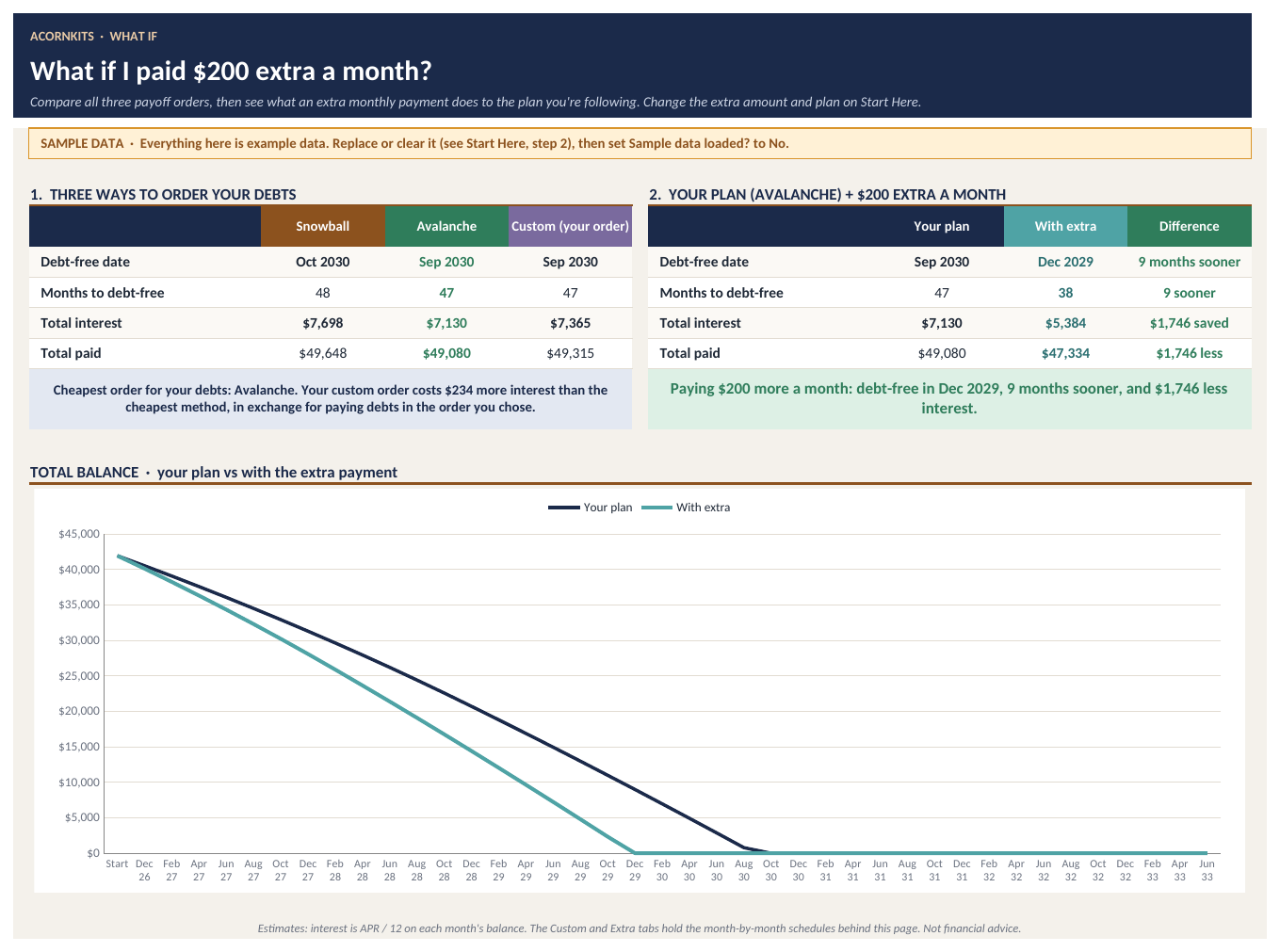
New: snowball vs avalanche vs your custom order, plus your plan with $X extra a month: months sooner and interest saved, with a chart.
Snowball
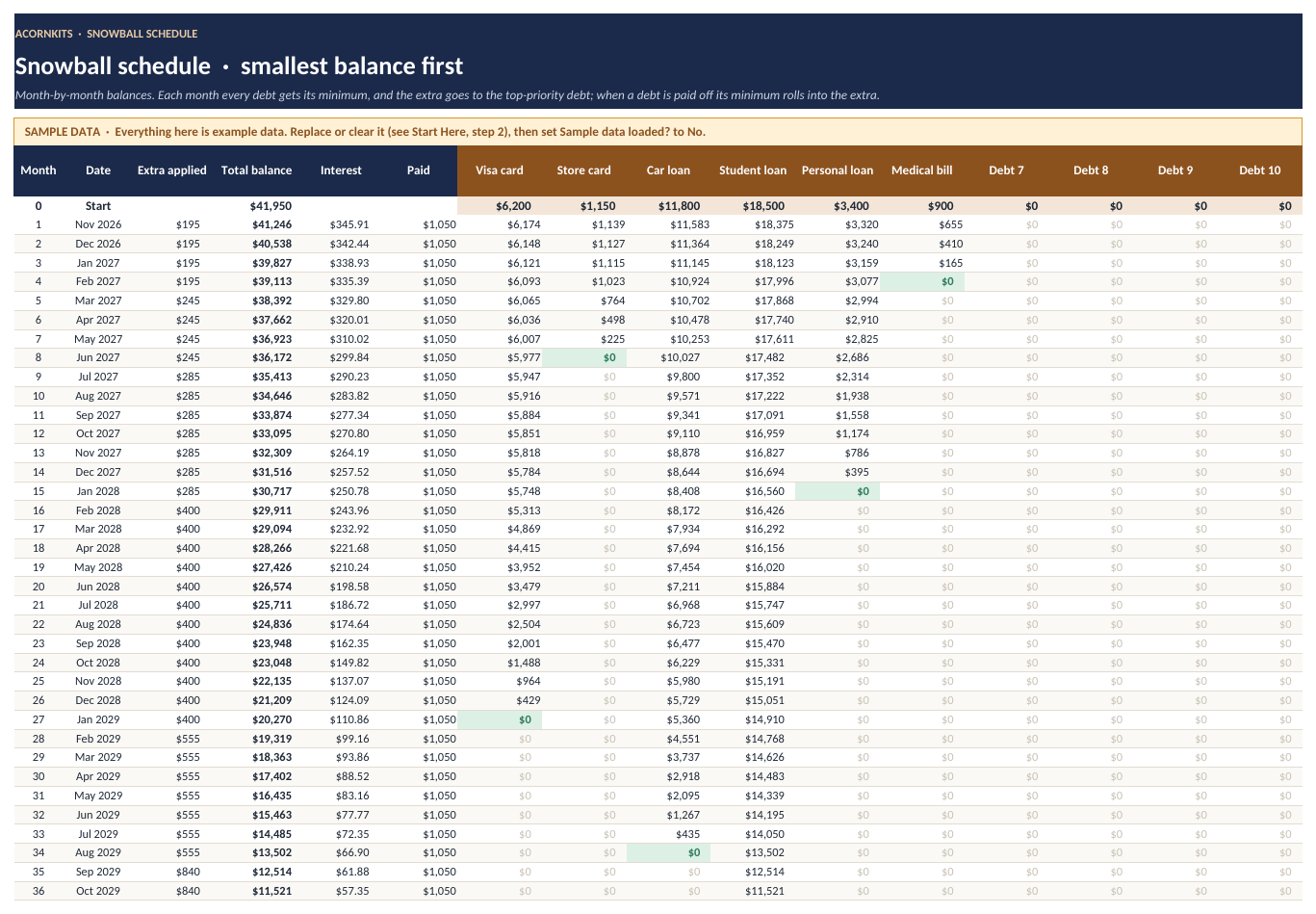
A 360-month schedule paying the smallest balance first. Freed-up minimums roll into the next debt.
Avalanche
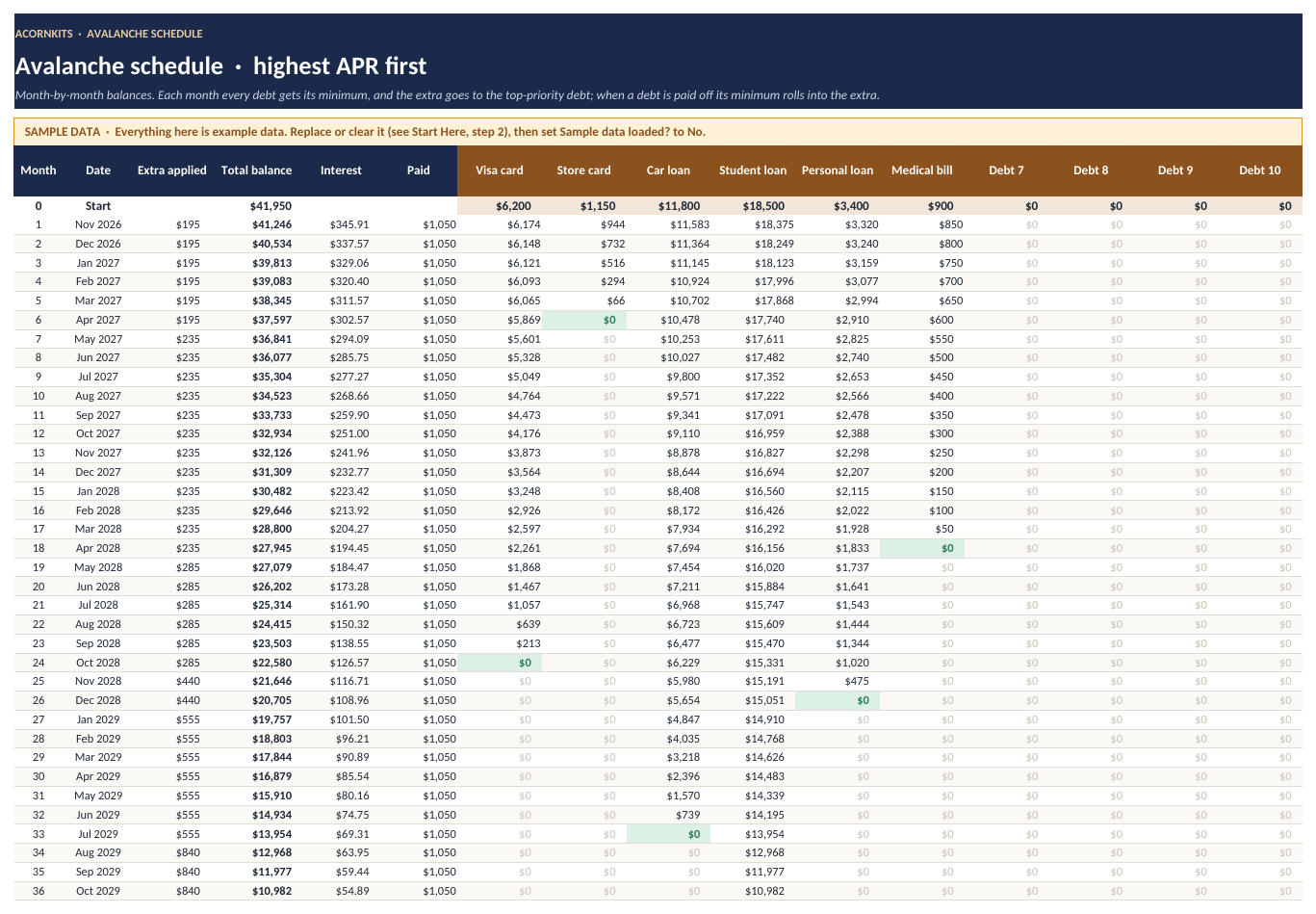
A 360-month schedule paying the highest APR first.
Custom and Extra
New: full schedules for your own payoff order and for your plan plus the extra amount.
Progress
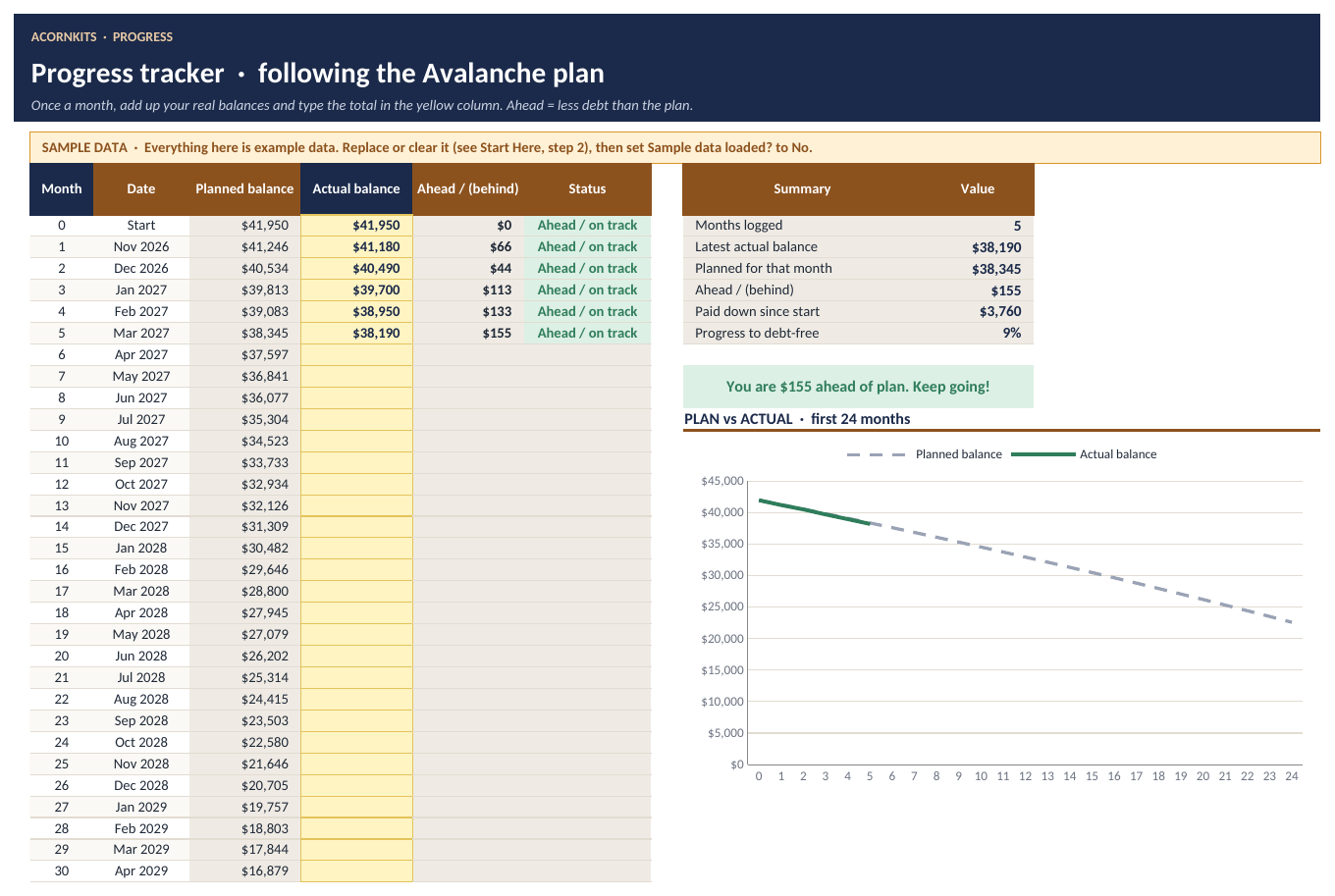
Log your real balance each month and see if you're ahead of or behind plan, with a chart.
See the actual workbook
These are renders of the real file with its SAMPLE data, made in LibreOffice. Fonts and colors look slightly different in Excel and Google Sheets. Tap any image to see it full size.
Is it a good fit?
Good fit for
- Anyone paying down credit cards, car loans, student loans or personal loans
- Couples who want one shared plan
- People deciding between the snowball and avalanche methods
- Anyone who wants a date to aim for and a way to track progress
Not a fit for
- Anyone who needs exact lender figures. Results are estimates.
- People looking for debt consolidation, credit counseling or financial advice
- Anyone with more than 10 separate debts to track
FAQ
How accurate are the dates and interest totals?
They're estimates. Interest is modeled as APR / 12 each month. Lenders may compound daily, add fees or change rates, so your statements may differ.
What if my minimum payment doesn't cover the interest?
The Debts sheet flags any minimum that's too low to cover the monthly interest so you can fix it.
Is this financial advice?
No. It's a planning tool that does math on the numbers you enter.
Does it work in Excel or Google Sheets?
It works in both. It's a standard .xlsx file built on common formulas, with no VBA. In Excel, just open the file. For Google Sheets, open a blank sheet at sheets.google.com and choose File > Import > Upload, then Replace spreadsheet (a free Google account works). Download on a computer or in a phone browser, not inside an app.
Are there macros?
No. There are no macros, scripts or add-ons, so it opens fine on locked-down work computers and in Google Sheets.
Is there sample data?
Yes. Every sheet comes filled with clearly marked SAMPLE data so you can see how it works. The Start Here tab lists exactly which ranges to clear when you're ready for your own numbers.
How do I get the file?
After you pay, Stripe takes you straight to a download page. The link is also on your Stripe receipt, so you can download the file again later.
What's your refund policy?
If the file won't open or is defective, contact us within 14 days of purchase and we'll refund you. Because it's an instant digital download, we don't offer refunds for change of mind. See the refund policy.
What can I do with it under the license?
It's licensed for personal use by one household. You can edit it for your own use, but you can't resell, share or redistribute the template files. See the terms.
Put a date on debt-free
9 sheets, SAMPLE data to learn from, works in Excel and Google Sheets.
Debt Payoff Planner is a planning tool. Results are estimates (interest modeled as APR / 12 per month), and your lender's numbers may differ. It isn't financial advice.